Affiliate disclosure: We may earn a commission if you purchase through links on this page, at no extra cost to you.
Kittl Review for Beginners
Kittl Review: Is It a Good Canva Alternative for Beginners?
Looking for an easy way to create professional graphics without being a designer?
Kittl is an online graphic design platform with templates, AI-powered tools, illustrations, fonts and editing features for creating social media graphics, blog images, logos, posters and other visual content.
In this Kittl review, we’ll look at how easy it is for beginners, what you can create, its main advantages and limitations, and how it compares with Canva.
⭐ Rated 4.5/5
✔ Beginner Friendly
✔ Free Plan Available
OVERALL RATING
4.5
★★★★☆
A creative design tool with plenty to offer beginners.
Kittl Quick Verdict
Kittl is worth considering if you’re a beginner looking for an alternative to Canva, particularly if you enjoy creating bold, highly visual designs.
There is a small learning curve, but after some experimenting I found the editor much easier to use.
Our Recommendation
Recommended for beginners, bloggers and creators who want an easy way to produce professional-looking graphics.
🎨
Best For
Bloggers & Creators
💻
Platform
Browser-Based
⭐
Ease Of Use
Very Good
💰
Value
Very Good
Our Verdict
Kittl is worth considering if you’re a beginner looking for an alternative to Canva, particularly if you enjoy creating bold, highly visual designs.
There is a learning curve when you first open the editor because Kittl gives you quite a few tools and options. However, after spending some time experimenting with the editor, creating a polished blog or social media graphic becomes much easier.
For beginners, we’d rate Kittl: 4.5/5 ⭐
I Tried Kittl as a Beginner — Here's What Happened
I already had a free Kittl account, but I hadn’t really used it. That made this a good opportunity to see what the platform is actually like for someone starting from scratch.
Rather than simply looking through Kittl’s features, I decided to create something I could genuinely use for Guide Into Place — a 1200 × 630 blog and social media graphic.
I started with a blank design, added the Guide Into Place branding, experimented with text, colours and images, and gradually built the graphic shown here.
My first impression? There are quite a few tools to learn, so it took some experimenting to find my way around. But I was able to create a finished graphic without previous Kittl experience or professional design skills.
That is one of the things I like about Kittl so far: you can start simple and learn the more advanced tools as you go.
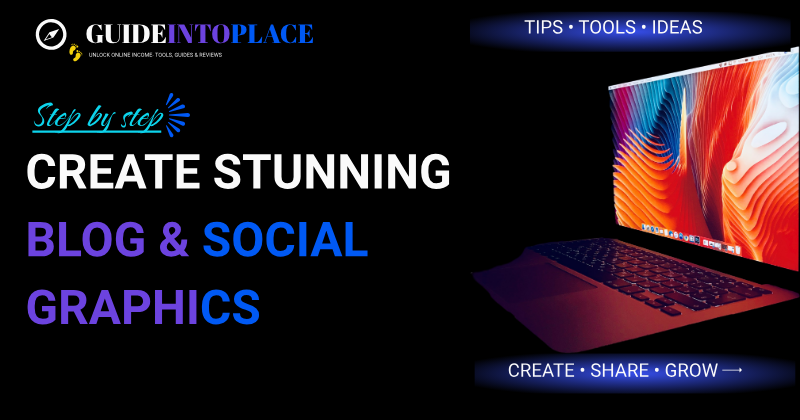
My first Guide Into Place graphic created while testing Kittl.
Pros and Cons
👍 What I Liked
- Beginner-friendly once you get familiar with the editor
- Good range of creative tools, typography and design controls
- Strong text and typography tools
- Good templates and design inspiration
- Useful AI-powered features
👎 Things I Found Limiting
- Editor can feel busy when you first open it
- Takes some experimenting to learn where everything is
- Free plan has a limited selection of elements
- Transparent-background downloads aren’t included in the free version
What is Kittl?
Kittl is an online graphic design platform that lets you create professional-looking graphics directly in your web browser.
It combines ready-made templates, text and typography tools, illustrations, photos, backgrounds and AI-powered design features in one editor.
You don’t need to install complicated design software, and you certainly don’t need to be a professional graphic designer to get started.
One thing I noticed when first opening Kittl is that there are quite a lot of tools and options on the screen. It can look a little overwhelming at first.
However, after spending some time experimenting with the editor, things start to make much more sense.
For example, I was able to create the blog and social media graphic shown in this review while learning how Kittl works.
Who is Kittl best suited for?
Kittl could be a good choice for:
✓ Bloggers creating featured images and blog graphics
✓ Social media creators making posts and promotional graphics
✓ Small businesses creating marketing materials
✓ Website owners needing banners, graphics and visual content
✓ Beginners wanting to improve their design skills
✓ Print-on-demand sellers creating artwork for merchandise
If you’re still building your first website, our Online Business Roadmap walks through the process step by step.
What Can You Create With Kittl?
One of Kittl’s strengths is the variety of designs you can create in the same platform. You can start with a template or create something from scratch and customise the text, colours, images and other design elements.
For bloggers, creators and small business owners, some of the most useful options include:
📝 Blog Graphics
Featured images, article graphics, website banners and promotional images.
These are particularly useful when you’re starting to create helpful content for your website.
📢 Posters & Marketing Materials
Posters, flyers, advertisements and promotional graphics.
📱 Social Media Graphics
Posts and promotional content for Facebook, Instagram, Pinterest and other social platforms.
Graphics like these can also support the strategies covered in our Grow Your Audience guide.
✨ AI-Assisted Designs
Kittl also provides AI-powered tools that can help generate images and develop creative ideas.
🎨 Logos & Branding
Logos, brand graphics, typography designs and other visual elements for your business.
👕 Print-on-Demand Designs
Create artwork for T-shirts, mugs, posters and other merchandise. Kittl also provides product mockups so you can preview how designs may look on products.
For Guide Into Place: The features I’m most interested in are blog graphics, social media images and website promotional graphics — exactly the types of designs I need regularly.
How Easy Is Kittl for Beginners?
Kittl is beginner-friendly, but I wouldn’t describe it as something you’ll understand completely the moment you open it.
When I first entered the editor, there were a lot of tools, menus and options to explore, and initially I wasn’t quite sure where everything was.
The good news is that you don’t need to understand all of those tools to start creating.
I began with a blank 1200 × 630 design and concentrated on the basics — adding text, changing colours, inserting an image, moving elements around and adding my Guide Into Place branding.
After some experimenting, the editor started to feel much more intuitive.
My experience as a beginner
What impressed me was that I could go from never really having used Kittl to producing a finished graphic that I was happy enough to use on Guide Into Place.
I certainly didn’t use every feature available, and there are still plenty of Kittl tools for me to learn.
But that’s actually encouraging.
You can start with the basics and discover the more advanced features as you need them.
Is there a learning curve?
Yes — a small one.
If you’ve never used an online graphic design program before, expect to spend a little time clicking around and experimenting.
But you don’t need professional design experience, and you don’t need to master the entire editor before you can create something useful.
Beginner Ease-of-Use Rating
4.5 ★★★★☆
My verdict: Very good for beginners who are prepared to spend a little time learning their way around the editor.
🎨 Beginner Experience
Learning Curve
Small
First Design
Created successfully
Previous Kittl Experience
Almost none
Ease of Use
4.5 ★★★★☆
Would I keep using it?
✓ Yes
Kittl Features I Found Most Useful
Kittl includes a lot of design tools, but as a beginner, I don’t think you need to learn everything at once.
These are the features that stood out to me while getting started.
🎨 Easy-to-Use Design Editor
Kittl’s editor lets you move, resize and arrange elements directly on your design.
Once I became familiar with where the main controls were, changing text, colours and images became fairly straightforward.
For a beginner, being able to experiment visually rather than learn complicated design software is a big advantage.
📷 Photos, Graphics & Design Elements
You can add images and other visual elements directly to your design and then resize and position them within the editor.
That’s exactly what I did when creating my first Guide Into Place graphic — combining an image with headings, branding and other design elements.
📐 Custom Design Sizes
This was particularly useful for me.
Instead of being restricted to a preset template, I could create the 1200 × 630 size I wanted for a Guide Into Place blog/social graphic.
For website owners, that’s useful because different places on a website and different social platforms often require different image dimensions.
🖼 Templates
You don’t always have to start with a blank page.
Kittl provides templates that can give you a starting point for different types of designs. You can then change the wording, fonts, colours and graphics to make the design your own.
For beginners who aren’t sure where to start, this can save a lot of time.
✨ AI-Powered Tools
Kittl includes AI-powered creative tools for generating and modifying visual content.
These include image generation, vector tools, background removal and image upscaling, along with tools for creating short motion clips directly within the design canvas.
For beginners, you certainly don’t need these features to start designing, but they provide plenty of room to experiment as your skills grow.
I haven’t tested all of Kittl’s AI and video features yet, so this is an area I’ll be interested to explore further as I spend more time with the platform.
AI design tools can also form part of a broader strategy for using AI tools in your online business.
✍️ Text & Typography Tools
This is one area where Kittl particularly caught my attention.
There are plenty of options for working with headings, fonts and decorative text, making it useful for social graphics, posters, logos and promotional designs where typography is an important part of the finished image.
👕 Product Mockups
Kittl includes mockup tools that let you preview designs on different products before using them in an online store or promotional material.
This could be particularly useful for print-on-demand sellers who want to see how a design looks on a physical product before publishing it.
I haven’t tested Kittl’s mockup tools yet, so this is a feature I still want to explore.
⭐ My Favourite Thing So Far
I like that Kittl gives me enough control to create something from scratch without forcing me to learn professional graphic design software first.
My first 1200 × 630 Guide Into Place graphic was created while I was still learning how to use the editor.
That gives me confidence that Kittl is a tool I could genuinely keep using.
Kittl Free vs Paid Plans
One of the good things about Kittl is that you can start with a free account and experiment with the editor before deciding whether you want to pay.
I was able to create my first Guide Into Place graphic using the free version, so you certainly don’t need a paid plan just to learn how Kittl works.
However, I also started noticing the limitations fairly quickly.
What I Found With the Free Version
The free plan gave me enough to create a design and get familiar with Kittl, but I found the choice of design elements quite limited.
Several times I found myself wanting to use an element or feature only to discover that it wasn’t available on the free plan.
Another limitation that stood out to me was transparent-background downloads weren’t available to me on the free version.
That’s particularly important if you’re creating things such as logos, website graphics or design elements that need to sit cleanly over different backgrounds.
Does That Mean You Need Kittl Pro?
Not necessarily.
If you’re completely new to Kittl, I’d still recommend starting with the free version first.
Use it to learn the editor, create a few designs and decide whether you actually enjoy working with Kittl.
But if you start using Kittl regularly for your website, social media or business graphics, I can see why upgrading becomes attractive.
In fact, after creating just my first few designs, I was already finding myself wanting access to more of the paid features.
⭐ My Take on the Free Plan:
Kittl Free is good for: Learning the editor and deciding whether Kittl suits you.
Where I felt restricted: The choice of elements and some useful export options.
Would I upgrade? If I continue using Kittl regularly for Guide Into Place, I would seriously consider it.
Kittl vs Canva for Beginners
Kittl and Canva are both online design platforms that can help beginners create professional-looking graphics without needing traditional graphic design software.
Canva is extremely well known and offers a huge range of templates and tools for everyday design tasks.
Kittl feels a little different.
From my experience using Kittl, it puts a strong emphasis on creative design, typography and giving you more control over individual elements. That makes it particularly interesting for logos, branding, posters, social media graphics and more creative visual designs.
Which Is Easier for Beginners?
Canva probably has the advantage for absolute beginners.
Its interface is designed around choosing a template and quickly changing the text, images and colours.
With Kittl, I found there was a little more to learn when I first opened the editor. There are plenty of tools and controls available, and initially I wasn’t always sure where to find what I needed.
However, after spending some time experimenting, Kittl became much easier to use.
I was able to create my first Guide Into Place blog and social media graphic without previous Kittl experience.
Where Kittl Stands Out
What I’ve particularly enjoyed about Kittl is the amount of creative control it gives you.
Its typography and design tools make it appealing when you want to go beyond simply modifying a ready-made template.
For someone interested in creating distinctive branding, promotional graphics, posters or more creative designs, Kittl is definitely worth exploring.
What About the Free Versions?
Both platforms allow beginners to start without immediately paying for a subscription.
With Kittl Free, I was able to learn the editor and create a finished graphic. However, I also started encountering limitations fairly quickly.
In particular, I found the choice of free design elements limited, and transparent-background downloads weren’t available to me on the free plan.
That’s something to consider if you’re planning to create logos or website graphics regularly.
Kittl or Canva — Which Would I Choose?
For someone who wants the quickest and simplest way to create everyday graphics, Canva may initially feel easier.
For someone who wants to experiment more with typography, branding and creative design, I’d certainly give Kittl a try.
At this stage, I don’t think there’s one winner for everybody.
My recommendation for a beginner is simple:
Try the free version of Kittl before deciding.
Spend a little time creating a real design rather than simply browsing templates. You’ll quickly discover whether Kittl’s way of designing suits you.
That’s exactly what I did for this review, and I was pleasantly surprised by what I could create despite having almost no previous experience with Kittl.
Quick Comparison
🎨 Kittl
Best for: Creative design, typography and greater design control
🖼️ Canva
Best for: Quick everyday graphics and beginners wanting simplicity
🏆 My Beginner Verdict
Both are worth considering, but Kittl offers enough that’s different to make it a genuine Canva alternative.
FREQUENTLY ASKED QUESTIONS
✅ Is Kittl good for beginners?
Yes. Kittl is suitable for beginners, although there is a small learning curve when you first open the editor. There are quite a few tools and options to explore, but you don’t need to learn everything at once. I was able to create a finished Guide Into Place graphic despite having almost no previous experience using Kittl.
✅ Can I use Kittl for free?
Yes. Kittl offers a free plan that lets you explore the editor and create designs without immediately paying for a subscription. I recommend starting with the free version so you can decide whether you enjoy using Kittl before considering an upgrade.
✅ What are the limitations of Kittl's free plan?
During my testing, I found the selection of free design elements fairly limited, and transparent-background downloads weren’t available to me on the free plan. Some other features and resources also require a paid plan.
✅ Can I use Kittl to create blog and social media graphics?
Yes. This was actually one of the first things I tested.
I created a custom 1200 × 630 blog and social media graphic for Guide Into Place using Kittl. You can combine text, images, colours, branding and other design elements to create graphics for your website and social channels.
✅ Can I create logos with Kittl?
Yes. Kittl includes typography, graphics, templates and other design tools that can be used to create logos and branding concepts.
If you need a transparent-background version of your logo or intend to use Kittl assets commercially, make sure the plan you’re using provides the appropriate export and licensing options.
✅ Does Kittl have AI tools?
Yes. Kittl includes AI-powered creative tools that can assist with generating images and developing design ideas.
You don’t need to use the AI features to get started, though. I created my first GITP graphic mainly using Kittl’s regular design editor.
✅ Is Kittl a good alternative to Canva?
It can be. Canva may feel more familiar to many beginners, while Kittl offers an interesting combination of typography, creative design tools and control over individual design elements.
Rather than deciding purely from feature lists, I’d recommend trying Kittl’s free version and creating a real design to see which platform feels more natural to you.
✅ Is Kittl Pro worth paying for?
That depends on how often you use it.
If you only need an occasional graphic, I’d start with Kittl Free. If you regularly create website graphics, social media content, branding or marketing materials and keep running into free-plan restrictions, a paid plan becomes much easier to justify.
My approach: start free, create a few real designs, and upgrade only when the limitations start getting in your way.
Final Verdict
Is Kittl Worth It for Beginners?
After spending time actually using Kittl and creating my first Guide Into Place graphic, I’ve come away impressed with what the platform offers.
Kittl isn’t completely effortless when you first open the editor. There are plenty of tools and options to explore, and it took me some experimenting before I became comfortable with where everything was.
The good news is that you don’t need to learn everything before you start creating.
I began with a blank canvas and produced a finished blog and social media graphic despite having almost no previous Kittl experience.
What About the Free Plan?
The free plan is a good place to start, but I noticed its limitations fairly quickly.
The selection of free elements felt restricted, and features such as transparent-background downloads aren’t available on the free plan.
For occasional designs, that may not matter. But if I continue using Kittl regularly for Guide Into Place, I can certainly see why upgrading to a paid plan would become attractive.
Who Would I Recommend Kittl To?
Kittl could be worth trying if you’re a:
✓ Beginner learning to create your own graphics
✓ Blogger creating featured images and website content
✓ Content creator making social media graphics
✓ Small business owner creating promotional material
✓ Website owner who regularly needs visual content
✓ Creator who enjoys experimenting with typography and designMy Overall Rating
4.5 ★★★★☆
Kittl is a capable and creative design platform that beginners can grow into.
It takes a little time to learn, but you don’t need professional design skills to start producing useful, professional-looking graphics.
My Recommendation
If you’re unsure whether Kittl is right for you, don’t pay for it immediately.
Start with Kittl Free. Create something you genuinely need — a blog image, social media post, logo or promotional graphic — and spend a little time learning the editor.
If you enjoy using it but begin running into the limitations of the free plan, that’s the point when I’d consider upgrading.
You can also explore more beginner-friendly platforms and tools in our Resource Hub.
Ready to Try Kittl?
Want to see whether Kittl suits the way you design?
Start with the free version and create something you genuinely need — a blog graphic, social media post or promotional image.
There’s no need to upgrade immediately. Try Kittl Free first and decide for yourself.
Free to get started. Upgrade only if you decide you need the additional features.
GuideIntoPlace
Your Guide to Building a Profitable Online Business
Learn, build and grow your online business with step-by-step guides, free calculators, AI tools and practical resources.
Getting Started
- Start Here
- Online Business Roadmap
- Resource Hub
- Get Reliable Web Hosting
- Build Your Website
- Create Helpful Content
- Grow Your Audience
Learn and Grow
- Affiliate Marketing
- SEO
- AI Tools
- Blogging
- Email Marketing
- Social Media
- Reviews
Business Tools
Helping beginners build profitable online businesses.
Made with ❤️ in New Zealand
© 2026 GuideIntoPlace